Shardstorm has zero lines of game code. No Unity project. No scenes. No scripts. What it does have is six completed pre-production specs, a phased roadmap, and four MCP servers generating assets from those specs.
The specs describe a game. The MCP servers let me see it and hear it before building it.
The Pre-Production Visibility Problem
The Playbook's pre-production phase produces documents. Requirements specs. Architecture diagrams. UI wireframes drawn in ASCII. Design system tokens in markdown tables. All of it is useful. None of it is visual.
That's a problem for a game where the entire value proposition is "does this look and feel satisfying?" You can spec the crystal shader parameters, define the glow token intensities, wireframe the HUD layout in monospace boxes. But you can't feel the vibe from a markdown file. The gap between "specified on paper" and "visible on screen" is where confidence lives.
MCP servers close that gap. Not by replacing the specs, but by generating visual and audio artifacts from them.
What's an MCP Server?
Model Context Protocol is the standard for connecting AI tools to development environments. An MCP server exposes capabilities (image generation, audio synthesis, design tools) that Claude Code can call directly during a conversation. Instead of leaving the terminal to open Midjourney or Figma, the tools are right there in the workflow.
The key difference from a regular API call: MCP servers have context. They can read your project files, understand your specs, and generate outputs that are informed by what you've already decided. You're not starting from a blank prompt. You're starting from six documents of design decisions.
Four Servers, Four Capabilities
mcp-image (Gemini): Concept Art and Mockups
This one produced the first visual artifact of the entire project.
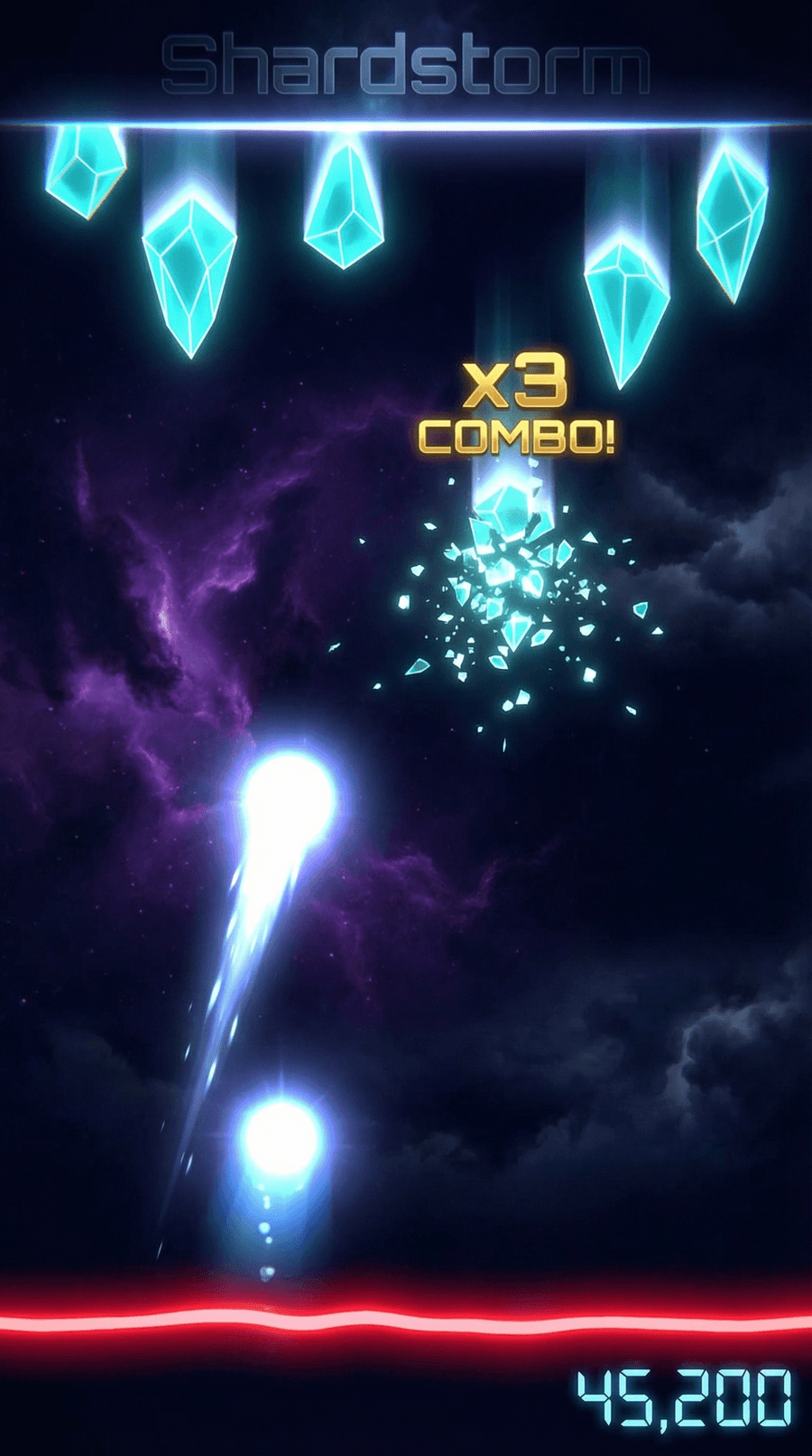
That's a gameplay mockup generated from the UI/UX spec's wireframe description. Cyan crystals descending. Light orb beam firing from the bottom. Crystal fragments mid-shatter. Gold combo text. Red danger line. Score display. Dark storm sky atmosphere.
It's not a screenshot of a game that exists. It's a screenshot of a game that could exist. And that distinction matters more than it sounds. When the Visual Target Build spike happens in production, this mockup becomes the reference. Not "make it look good" but "make it look like this."
The wireframe in the UI/UX spec described these elements as ASCII boxes. The mockup shows them as a cohesive visual. Same information, completely different level of confidence that the aesthetic works.
stitch (Google Stitch): UI Screen Generation
Stitch generates UI screens from descriptions. Menu layouts, card designs, upgrade trees. The kind of screens that UI Toolkit will render but that are tedious to mock up by hand during pre-production.
The design system spec defines twelve components with specific tokens, states, and sizing. Stitch can generate screens that use those components in context, showing what the upgrade pick screen actually looks like with three cards stacked vertically, rarity badges in the corners, and a Crystal Blue glow on the selected card.
Figma MCP: Design-to-Code Bridge
The Figma integration connects the design system spec to actual design files. USS variables map directly to Figma tokens. Component specs map to Figma components. Changes in Figma propagate back to the codebase.
For a solo developer, this matters because the designer and the developer are the same person. Without the bridge, you design in Figma, then manually translate every token and component to USS. With it, the translation is automated. Change a color token in Figma, see it reflected in the USS stylesheet.
ElevenLabs MCP: Sound Design
Crystal shatters need sound. Storm ambience needs sound. UI interactions need sound. The audio direction in the UI/UX spec describes five categories of sound (ambient, crystal SFX, orb SFX, UI SFX, combo/reward) but audio assets are traditionally deferred to mid-production.
ElevenLabs generates sound effects from text descriptions. "Glass crystal shattering with a bright sparkle tail" produces a usable SFX file. "Dark electronic ambient pulse with crystalline pads" produces a background loop. These aren't final assets. They're auditory mockups, the same way the gameplay image is a visual mockup. They let you hear the game's audio direction before opening a DAW or purchasing an Asset Store pack.
Phased Tooling
Not every MCP server belongs in every phase. Installing everything on day one creates noise. The Shardstorm roadmap maps MCP installations to the Playbook phases where they become relevant:
Pre-Production (now): mcp-image, stitch, Figma MCP, ElevenLabs. These generate visual and audio artifacts from specs. They're useful before any code exists.
Dev Environment Setup: mcp-unity (CoderGamester). This integrates with the Unity Editor for scene manipulation, GameObject creation, console log reading, and test running. Useless without a Unity project. Essential once one exists.
Production: ShaderToy MCP for referencing GLSL shader patterns during crystal shader development. XcodeBuildMCP for building and debugging the Unity-exported Xcode project on device.
Launch: asc-mcp for App Store Connect (TestFlight, provisioning, metadata). fastlane MCP for automated build-sign-upload pipelines.
Each tool arrives when the workflow needs it. The pre-production tools generate mockups. The production tools manipulate the engine. The launch tools automate distribution. Same Playbook phases, different toolchain at each one.
What This Changes About Pre-Production
Traditional pre-production ends with documents and wireframes. You hand them to production and hope the vision translates. The first time you see the game looking like a game is weeks into development, after shaders are written and UI is built.
With MCP-generated mockups, pre-production ends with documents AND visuals AND audio sketches. The Visual Target Build spike in production doesn't start from imagination. It starts from a reference image that everyone (including future-me in three weeks who forgot what I was going for) can point at and say "like that."
The mockup also tests the design system's coherence before implementation. The cyan crystals against the dark storm sky with gold combo text and a red danger line. Do those colors work together? Does the visual hierarchy read correctly? You can answer that from the mockup without writing a single shader.
The Toolchain Mindset
The shift here isn't "use AI to generate stuff." It's "plan your AI tooling the same way you plan your tech stack." Which tools, when, and why.
mcp-image isn't a novelty. It's a pre-production tool that generates visual targets from specs. ElevenLabs isn't a toy. It's a sound design tool that produces auditory mockups before the audio integration sprint. Figma MCP isn't automation for its own sake. It's a bridge that prevents manual translation between design tokens and USS variables.
Each one solves a specific gap in the development workflow. Each one maps to a phase where that gap exists. That's not AI hype. That's toolchain planning.
What's Next
The Visual Target Build is still the gate. One crystal, one orb, one shatter. But now it has a visual target to hit: the mockup generated from the spec. And when the crystal shader spike starts, ShaderToy MCP will be there with GLSL reference patterns. And when the first sound effects need wiring up, ElevenLabs will have already generated the candidates.
The tools arrive when the work does. That's the whole point.